Stiffness
Use the Stiffness tool to define stiffness properties for steel elements used in the design workflow.

This tool is available only for calculated steel joints, so the Check must be done to the joint where you want to override the calculated stiffness value.
When you activate the tool, the Steel joint stiffnesses dialogue opens.

The dialogue shows all joints in the project in a table view.
Table columns
-
Joint/Group – joint or joint-group name.
-
Stiffness – calculated and/or user-set stiffness value.
-
Apply – choose Yes or No to include or exclude the selected joint stiffness in the global analysis.
Bottom buttons
-
Apply none – set Apply = No for all joints in the table.
-
Apply all – set Apply = Yes for all joints in the table.
If you click a joint in the model view or click a joint name in the table, the Set joint stiffness dialogue opens.
Set joint stiffness dialogue
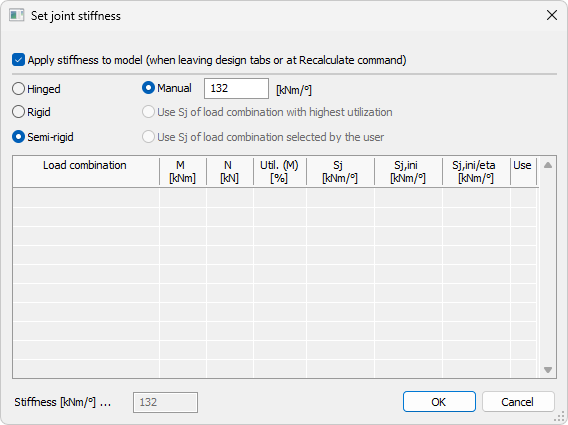
At the top of the dialogue there is one apply checkbox.
- Apply stiffness to model (when leaving design tabs or at Recalculate command) – acts the same as the Apply column in the table view.
When this checkbox is checked, stiffness type options become available:
-
Hinged – apply hinged behaviour.
-
Rigid – apply rigid behaviour.
-
Semi-rigid – apply semi-rigid behaviour.
When Semi-rigid is selected, additional options are available:
-
Manual – manually define the stiffness value.
-
Use Sj of load combination with highest utilization – automatically use Sj from the governing load combination.
-
Use Sj of load combination selected by user – use Sj from a load combination selected in the table.
Load combinations table columns
-
Load combination – load combination identifier.
-
M – bending moment value for the joint.
-
N – axial force value for the joint.
-
Util. (M) – utilization related to bending moment.
-
Sj – secant stiffness for the combination.
-
Sj,ini – initial rotational stiffness.
-
Sj,ini/eta – adjusted initial rotational stiffness ratio.
-
Use – selection control for which load combination is used for stiffness assignment.
Below the table there is a Stiffness field showing the currently selected stiffness value.