Check
Check
Foundation design Check helps you verify the utilization of foundation elements and review the results in a compact table layout.

When you activate Check, a tool palette opens with two tools:
- Check objects – runs the design check for foundation elements and displays the utilization table.
- Check relative settlements – opens the Settlements dialogue showing relative settlement results between foundation points.
Check objects
When you select Check objects, a Display table checkbox becomes available in the tool palette. Enabling it opens the Utilization table.

Utilization table

The Utilization table is split into two tables:
- Groups table (top) – shows design groups and ungrouped single elements.
- Element details table (bottom) – shows detailed utilization results for elements in the selected group, or for the selected ungrouped single element.
Groups table columns
- Group – group name, or the element name when the row is an ungrouped single element.
- Total weight – total weight of the foundation element.
- Max. – maximum utilization in the group.
- Min. – minimum utilization in the group.
Element table columns for isolated foundation and wall foundation
- Item – element name.
- Max. – maximum utilization.
- BE – load bearing utilization.
- SL – sliding utilization.
- SE – settlement utilization.
- INS – insulation utilization.
Element table columns for foundation slab
- Item – element name.
- Max. – maximum utilization.
- SEA – absolute settlement utilization.
- SEL – limit settlement utilization.
- SE – settlement utilization.
- INS – insulation utilization.
Buttons
- Show only visible objects in the table – checkbox to limit rows to currently visible model objects.
- Check – runs the design check for the selected table row.
Check relative settlements
When you select Check relative settlements, the Settlements dialogue opens. The same dialogue is used for all foundation subtypes.
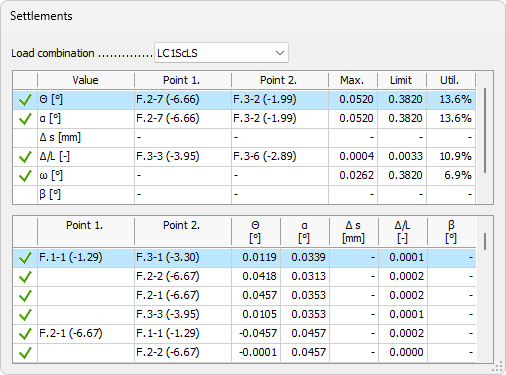
- Load combination – drop-down menu to select the load combination for which the settlement results are displayed.
Summary table
The top table shows the worst-case result for each active settlement criterion:
- Point 1. – first point of the worst-case element pair for the criterion.
- Point 2. – second point of the worst-case element pair for the criterion.
- Max. – maximum computed value for the criterion.
- Limit – limit value set in the settlement parameters.
- Util. – utilization as a percentage of the limit.
The rows correspond to the settlement criteria enabled in Configure design:
- Θ – tilt angle.
- α – slope angle.
- Δs – differential settlement.
- Δ/L – relative deflection ratio.
- β – angular distortion.