Column corbel
Use the Column corbel tool to insert a corbel — a short cantilevered bracket — at the top or bottom of a column to support beams or slabs.

When you select Column corbel, a tool palette opens.

Main tools
- Define – place a new corbel on an existing column
- Properties – check or edit the properties of an existing corbel. Opens the Default settings dialogue for the selected corbel
- Default settings – set default parameters for corbel geometry and material (read below in more detail)
Main setting
Available when the Define tool is selected.
- ɑ – drop-down menu for selecting the direction of the corbel based on the column's orientation. Options are 0°, 90°, 180°, and 270°, corresponding to the four sides of the column
Default settings dialogue
When you press the Default settings button, a dialogue window opens.
This dialogue contains four tabs: General, Section, Material, and End conditions.
General tab
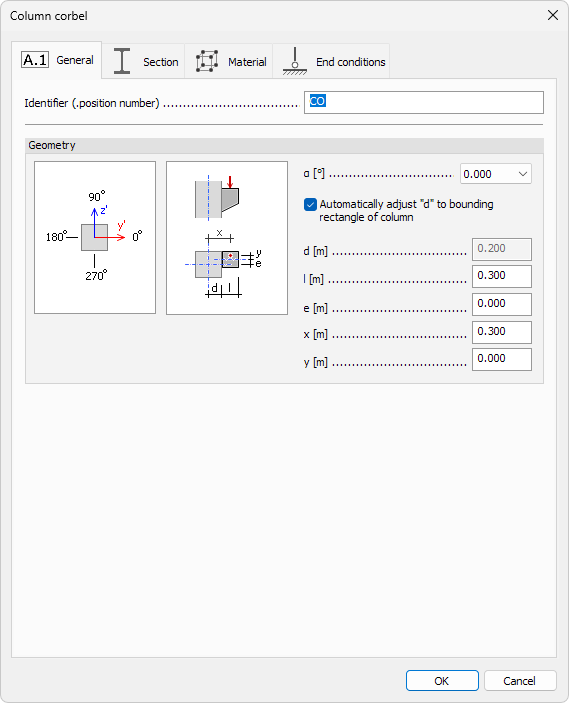
This tab defines the corbel's placement, geometry, and behavior.
- Identifier – name or label for the corbel
- ɑ – select the side of the column using predefined angles (0°, 90°, 180°, or 270°)
- Automatically adjust "d" to bounding rectangle of column – when checked, the d value will automatically adapt to the outer face of the column
- d – distance from the corbel face to the connected element’s reference line. Editable only when the checkbox above is unselected
- l – horizontal projection length of the corbel
- e – lateral eccentricity of the corbel relative to the column center
- x – distance from the column's reference line to the applied load on the corbel
- y – lateral offset of the loading point from the center of the corbel
Section, Material, and End conditions
These follow standard bar element settings.
note
To read more about these tabs, see the relevant topics below:
- For Section tab:
User interface ➔ Tab menus ➔ Structure ➔ Additional dialogues ➔ Bar Section - For Material tab:
User interface ➔ Tab menus ➔ Structure ➔ Additional dialogues ➔ Regular Material - For End conditions tab:
User interface ➔ Tab menus ➔ Structure ➔ Additional dialogues ➔ Bar End Conditions