Calculation parameters
Calculation parameters
Calculation parameters tool is used to set the design and verification parameters for composite elements.

When you select the tool then you need to select the element for which you want to set the design parameters. After selecting the element, the calculation parameters dialogue will open. The dialogue depends on the selected subtype of design and contains different parameters for the Composite column and Deltabeam subtypes.
Parameters for Composite column
When you select a composite column element, the Calculation parameters dialogue opens with two tabs: General and Fire.
General tab
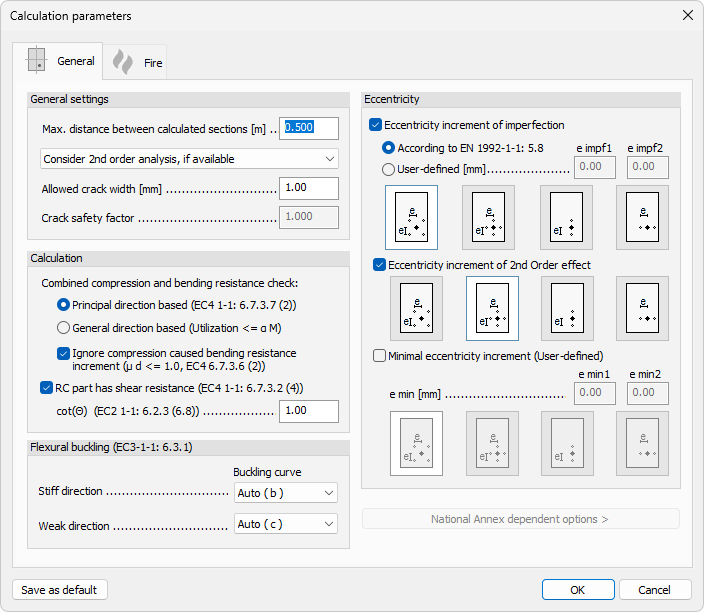
General settings
- Max. distance between calculated sections – set the maximum distance between the sections where design calculation is performed
- Consider 2nd order analysis, if available – drop-down menu to select how 2nd order analysis is considered, if available
- Allowed crack width – set the allowed crack width used in crack width checks
- Crack safety factor – set the safety factor used in crack width checks
Calculation
- Combined compression and bending resistance check – select the resistance check method:
- Principal direction based (EC4 1-1: 6.3.7 (2))
- General direction based (Utilization ≤ α M)
- Ignore compression caused bending resistance increment (μ d ≤ 1.0, EC4 6.7.3.6 (2)) – enables ignoring the bending resistance increment caused by compression
- RC part has shear resistance (EC4 1-1: 6.7.3.2 (4)) – enables shear resistance contribution from the RC part
- cot(θ) (EC2 1-1: 6.2.3 (6.8)) – set the cot(θ) value used for the RC part shear resistance
Flexural buckling (EC3-1-1: 6.3.1)
- Stiff direction – drop-down menu to select the buckling curve used for the stiff direction
- Weak direction – drop-down menu to select the buckling curve used for the weak direction
Eccentricity
- Eccentricity increment of imperfection – enables eccentricity increment for imperfection, based on either:
- According to EN 1992-1-1: 5.8
- User-defined – set the e impf1 and e impf2 values
- Eccentricity increment of 2nd Order effect – enables eccentricity increment for the 2nd order effect
- Minimal eccentricity increment (User-defined) – enables a user-defined minimal eccentricity increment, set with the e min1 and e min2 values
- National Annex dependent options > – opens additional options that depend on the selected National Annex
Fire tab
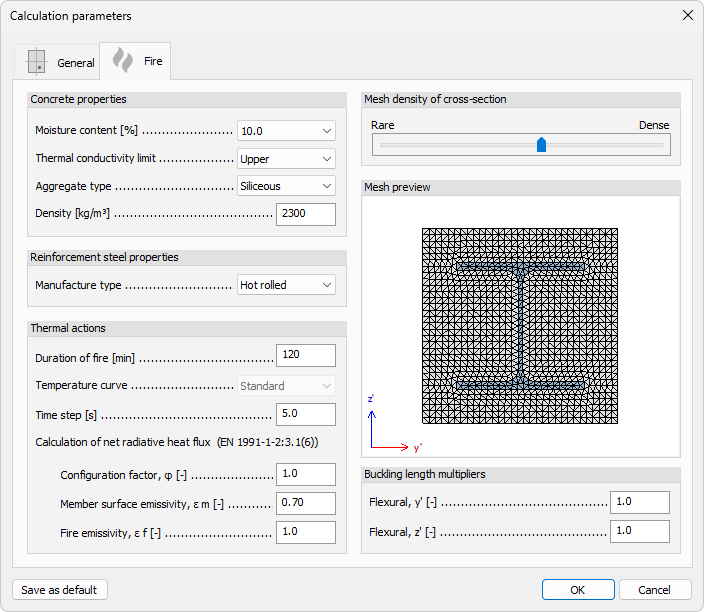
Concrete properties
- Moisture content – set the moisture content of the concrete
- Thermal conductivity limit – drop-down menu to select the thermal conductivity limit
- Aggregate type – drop-down menu to select the aggregate type
- Density – set the density of the concrete
Reinforcement steel properties
- Manufacture type – drop-down menu to select the manufacturing type of the reinforcement steel
Thermal actions
- Duration of fire – set the duration of the fire
- Temperature curve – drop-down menu to select the temperature curve
- Time step – set the time step used in the fire calculation
- Calculation of net radiative heat flux (EN 1991-1-2:3.1(6)) – set the values used to calculate the net radiative heat flux:
- Configuration factor, φ
- Member surface emissivity, ε m
- Fire emissivity, ε f
Mesh density of cross-section
- Rare – Dense – slider to set the mesh density used for the cross-section fire calculation
The Mesh preview shows the resulting mesh for the selected cross-section
Buckling length multipliers
- Flexural, y' – set the buckling length multiplier for the y' direction
- Flexural, z' – set the buckling length multiplier for the z' direction
Parameters for Deltabeam
When you select a Deltabeam element, the Calculation parameters dialogue opens.

- Maximal distance between calculated sections – set the maximum distance between the sections where design calculation is performed