Custom result library
The Custom result library tool is used to create, edit and manage user-defined result configurations that can be reused for result presentation and documentation.

When you activate this tool, a dialogue window opens.
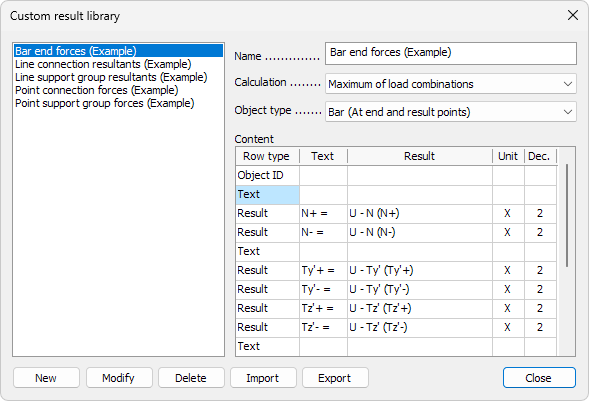
Library list
On the left side of the dialogue, a list of existing custom result definitions is shown.
Each item in the list represents one custom result setup that can be selected, edited or reused.
General settings
On the right side of the dialogue, the general settings of the selected custom result are defined:
- Name – name of the custom result definition
- Calculation – select which calculation results are used. Options are:
- Load case
- Load combination
- Maximum of load combinations
- Maximum of load groups
- Object type – select the type of object the custom result applies to. Options are:
- Bar (At end and result points)
- Point support group
- Line support group (Resultant)
- Surface support group (Resultant)
- Point connection
- Line connection (Resultant)
- Surface connection (Resultant)
Content
The Content table defines what information is included in the custom result. Each row represents one line in the result output.
The following column types are available:
- Row type – define the type of row
- Object ID – display the identifier of the evaluated object
- Text – insert static descriptive text
- Result – insert a calculated result value
- Text – insert text for rows with type Text or insert prefix for rows with type Result
- Result – select which result quantity is evaluated (available only for Result rows)
- Unit – select if you want to show the unit with the result value
- Dec. – number of decimal places shown for the result value
Controls
At the bottom of the dialogue, the following controls are available:
- New – create a new custom result definition
- Modify – edit the selected custom result definition
- Delete – remove the selected custom result definition
- Import – import a custom result definition from file
- Export – export the selected custom result definition to file