Foundation General
The General tab appears in every foundation-type tool and sets up the soil interaction and insulation properties that apply to the element. Some tools use full dialogue, others use only reduced version. Following tools use this dialogue:
- Isolated foundation
- Wall foundation
- Foundation slab
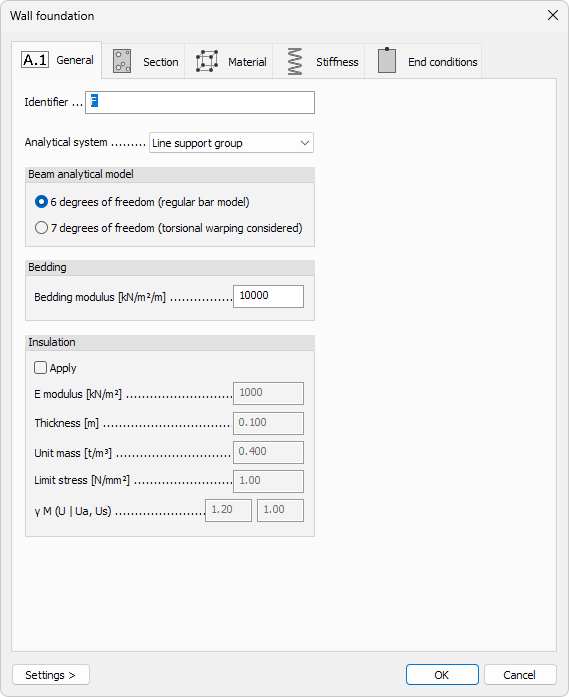
When you open the General tab of a foundation’s Default settings, the following (or similar) dialogue window appears.
Identifier
- Identifier – label shown in schedules, lists, and tooltips for the foundation element
Analytical system
-
Analytical system – drop-down list that defines how the soil support is modelled. Different foundation types support only their relevant analytical systems. Not available for Foundation slab.
- Surface support group
- Point support group
- Line support group
-
Remove soil above slab (basement) – checkbox available only for Foundation slab.
When selected, the program ignores soil weight above the slab during analysis.
Beam analytical model
Only available for Wall foundation
- 6 degrees of freedom – regular bar model without warping effects
- 7 degrees of freedom – bar model with torsional warping effects considered
Bedding
Numeric fields for spring stiffness between the foundation and soil. Isolated foundation and Wall foundation only use one bedding modulus value:
- Bedding modulus – compression stiffness in global Z
For Foundation slab, there are separate moduli for different directions
- Vertical bedding modulus – compression stiffness in global Z
- x′ bedding modulus – horizontal stiffness along local x′
- y′ bedding modulus – horizontal stiffness along local y′
Insulation
Enable and define insulating layers between the foundation and the soil.
- Apply – master checkbox to activate insulation parameters
- E modulus – elastic modulus of the insulation material
- Thickness – layer thickness
- Unit mass – mass density used in dynamic calculations
- Limit stress – allowable stress of the insulation layer
- γ M – partial safety factor