Timber shell Material
The Timber shell - Material dialogue lets you edit analytical factors and application data for timber shells materials.
Overall layout of the dialogue
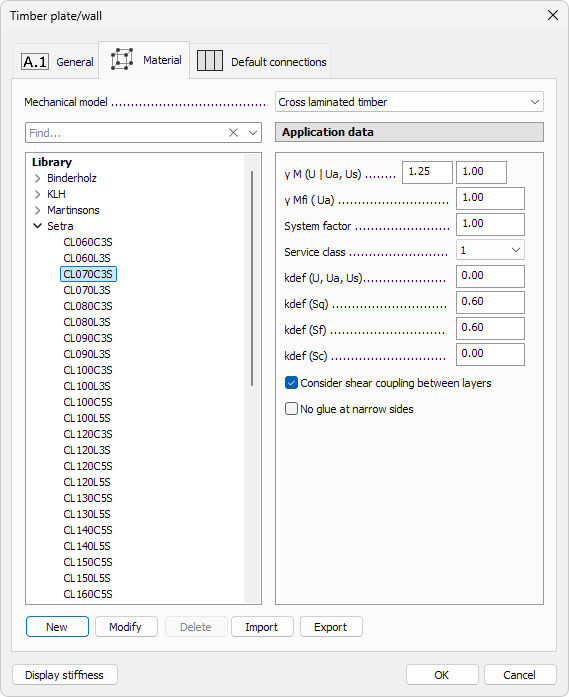
The dialogue consists of four main areas:
At the top:
-
Mechanical model – drop-down menu with three options. Each type has its own library and specific application data settings (read below in more detail):
- Orthotropic shell – for orthotropic timber materials like OSB or particle boards
- Cross laminated timber – for CLT materials that are described by layer properties
- General laminated composite – for all other general type of laminated composite materials
On the left-hand side:
- Find – search materials by typing the name
- material tree grouped by the available material types. This shows both library materials and those already used in the project
On the right-hand side:
- γ M (U | Ua, Us) – two numeric fields for partial factors in ultimate, accidental and seismic analyses
- γ Mfi (Ua) – numeric fields for partial factors in fire analyses
- System factor – numeric field for system effects
- Service class – drop-down list (Class 1, Class 2 or Class 3) corresponding to moisture and temperature conditions
- kdef (U, Ua, Us) – one numeric field for deformation factor used in ultimate combinations
- kdef (Sq) – deformation factor for quasi-permanent SLS combination
- kdef (Sf) – deformation factor for frequent SLS combination
- kdef (Sc) – deformation factor for characteristic SLS combination
- Consider shear coupling between layers – when enabled, the program models shear interaction between the layers of laminated timber. This increases overall stiffness, since adjacent layers can transfer shear forces. If unchecked, each layer behaves independently in shear
- No glue at narrow sides – when ticked, transverse stiffness is reduced accordingly, reflecting a more flexible panel behaviour
Below the material library are the library manipulation buttons:
- New – add a new material to the currently selected mechanical model (orthotropic shell, cross laminated timber, general laminated composite). Opens the material specific dialogue with material properties. The new material takes by default the same values as the selected material has when the button was pressed (read below in more detail)
- Modify – modifies the currently selected material properties. Opens the same dialogue as the New button. Can be used for user-created materials. When used on built-in materials, shows the values in read-only format only
- Delete – remove the highlighted entry from the library. You cannot delete the built-in materials
- Import – load a saved .fdltpt (material-library) file. Entries with matching names will be ignored, keeping the local material definitions
- Export – write the entire library (or the selected material group) to an external .fdltpt file for backup or sharing
New material
When you press New or Modify from the library manipulation buttons opens a new dialogue for material properties. Dialogue depends on the selected material model.
Orthotropic shell

Overall settings
- Name – text field for the material name shown in schedules, lists and tooltips
- Thickness – numeric field for shell thickness
- Group – drop-down list with all the groups in the orthotropic shell library
Stiffness tab
Some stiffness factors have values for both at 0° (parallel with grain) and at 90° (perpendicular to grain), but some are single value for the whole shell.
- Em,k – modulus of elasticity with regards to bending
- Et,k – modulus of elasticity with regards to tension
- Ec,k – modulus of elasticity with regards to compression
- Gr,k – rolling shear modulus
- Gv,k – vertical shear modulus (single field)
- ρ – density (single field)
Strength tab

Some strength factors have values for both at 0° (parallel with grain) and at 90° (perpendicular to grain), but some are single value for the whole shell.
- fm,k – bending strength
- ft,k – tensile strength
- fc,k – compressive strength
- fr,k – rolling shear strength
- fv,k – shear strength (single field)
Factors tab

Each factor has three numeric fields – one for each service class (1, 2, 3).
- kdef – deformation factor
Modification factor for duration of load and moisture content:
- kmod – Permanent
- kmod – Long term
- kmod – Medium term
- kmod – Short term
- kmod – Instantaneous
Cross laminated timber
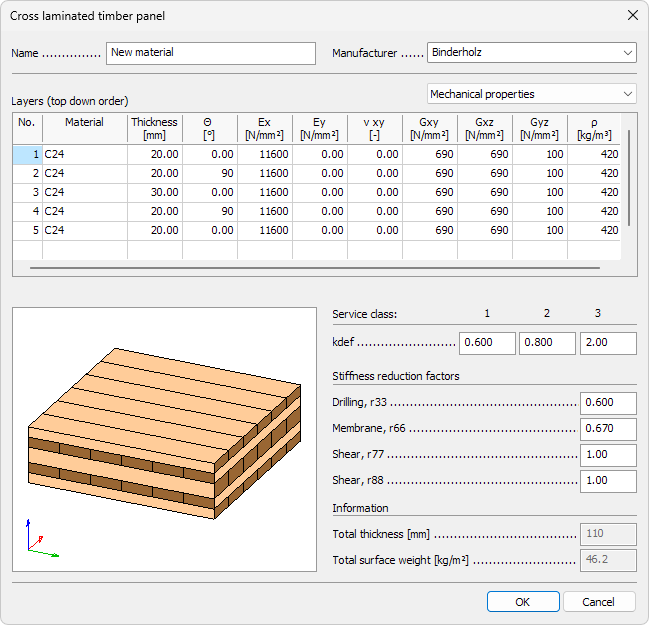
Overall settings
- Name – text field for the material name shown in schedules, lists and tooltips
- Manufacturer – drop-down list with all the groups in the CLT library
- kdef – three numeric fields for deformation factor, one for each service class (1, 2, 3)
- Stiffness reduction factors – numeric fields for:
- Drilling, r33
- Membrane, r66
- Shear, r77
- Shear, r88
- Total thickness – read-only field, automatically calculated from the sum of the defined layers
- Total surface weight – read-only field, weight per unit area based on thickness and density
Layer data
The dialogue contains a drop-down menu that changes the content of a layer table:
- Mechanical properties
- Limit stresses
Mechanical properties table
For each layer you can define:
- Material – select from the regular material list
- Thickness – numeric thickness of the layer
- Θ – grain angle of the layer
- Ex – modulus of elasticity in x-direction
- Ey – modulus of elasticity in y-direction
- νxy – Poisson’s ratio
- Gxz – shear modulus in x–z plane
- Gyz – shear modulus in y–z plane
- ρ – density
Limit stresses table
For each layer you can define:
- Material – select from the regular material list
- fm0k – bending strength, parallel to grain
- fm90k – bending strength, perpendicular to grain
- ft0k – tensile strength, parallel to grain
- ft90k – tensile strength, perpendicular to grain
- fc0k – compressive strength, parallel to grain
- fc90k – compressive strength, perpendicular to grain
- fxyk – shear strength in-plane
- fνk – shear strength perpendicular to grain
- fRk – rolling shear strength
- fTork – torsional strength
General laminated composite
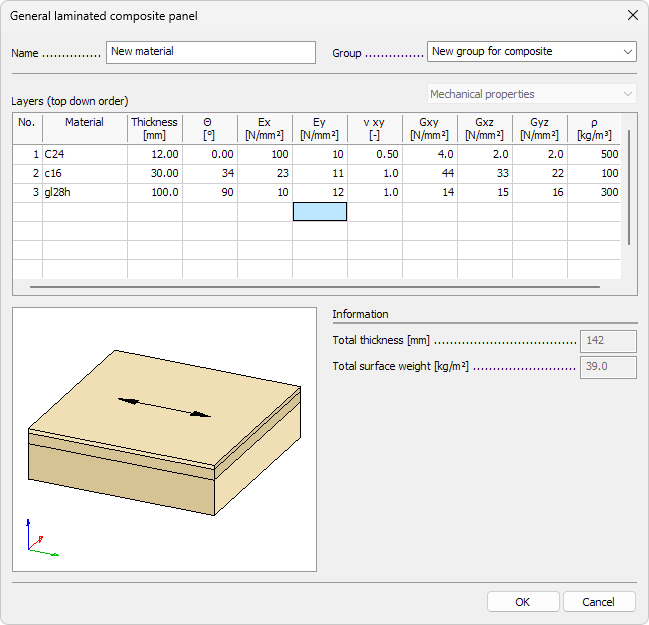
Overall settings
- Name – text field for the material name shown in schedules, lists and tooltips
- Group – drop-down list with all the groups in the laminated composite library
- Total thickness – read-only field, automatically calculated from the sum of the defined layers
- Total surface weight – read-only field, weight per unit area based on thickness and density
Layer data and Mechanical properties
Unlike Cross laminated timber, this dialogue does not provide a Limit stresses option – only Mechanical properties are available.
For each layer you can define:
- Material – select from the regular material list
- Thickness – numeric thickness of the layer
- Θ – grain angle of the layer
- Ex – modulus of elasticity in x-direction
- Ey – modulus of elasticity in y-direction
- νxy – Poisson’s ratio
- Gxz – shear modulus in x–z plane
- Gyz – shear modulus in y–z plane
- ρ – density