Soil material
The Soil material dialogue manages soil libraries and lets you define parameters for foundation design and deformation analyses.
Overall layout of the dialogue
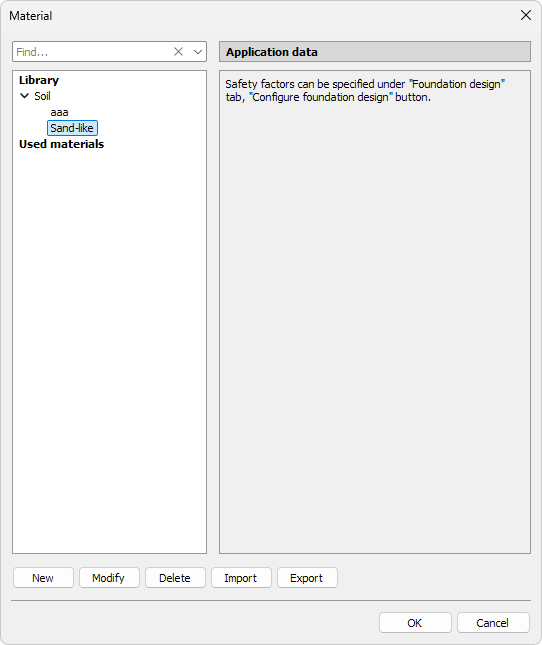
The dialogue consists of three main areas:
At the top:
- Find – search materials by typing the name
On the left-hand side:
- Material tree grouped by soil types. This shows both library soils and those already used in the project
On the right-hand side:
- No editable parameters
- Message: “Safety factors can be specified under Foundation design tab, Configure foundation design button.”
At the bottom of the dialogue are library manipulation buttons:
- New – add a new soil material to the library (opens soil-specific dialogue, see below)
- Modify – edit the selected soil material (opens the same dialogue as New)
- Delete – remove the highlighted entry from the library (built-in entries cannot be deleted)
- Import – load a saved .fdsoil library file. Entries with matching names will be ignored, keeping the local material definitions
- Export – save the entire soil material library to an external .fdsoil file
New material
When you press New or Modify, a dedicated soil material dialogue opens.
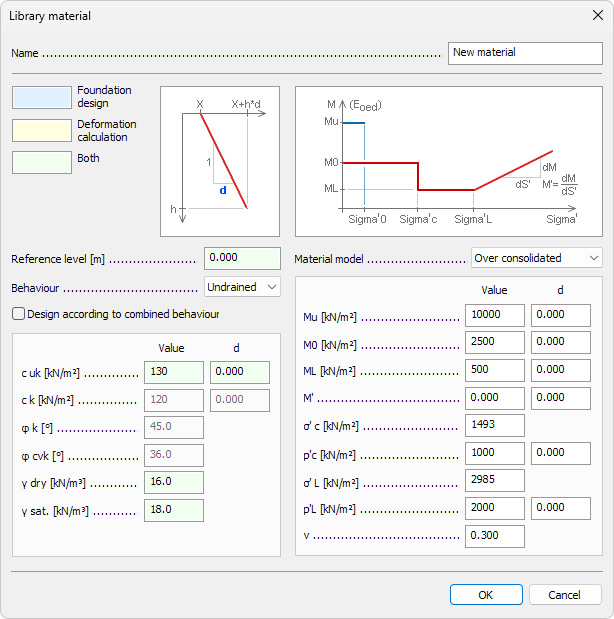
Name
- Name – text field for the material name shown in schedules, lists and tooltips
Strength parameters (left-hand side)
Strength properties are colour-coded by their use:
- blue – used in foundation design
- yellow – used in deformation calculation
- green – used in both
- Reference level – numeric field for soil layer depth
- Behaviour – drop-down list: Undrained or Drained
- Design according to combined behaviour – checkbox to combine drained and undrained behaviour
- cuk – characteristic undrained cohesion (with depth-dependence d)
- ck – characteristic cohesion (with depth-dependence d)
- φk – effective friction angle
- φcvk – characteristic constant-volume (critical state) friction angle
- γdry – unit weight in dry state
- γsat – unit weight in saturated state
Depth-dependence (d) fields describe linear variation of the parameter with soil depth. A diagram next to the input illustrates the meaning of d.
Deformation parameters (right-hand side)
The Material model drop-down defines how soil stiffness is represented:
- Linear
- Over consolidated
- Generic
Each model shows a different set of parameters and diagram:
Linear model
- M0 – constrained modulus (with depth-dependence d)
- E – Young’s modulus (with depth-dependence d)
- ν – Poisson’s ratio
M0 and E are mutually exclusive – selecting one disables the other.
Over consolidated model
- Mu – constrained modulus at ultimate state (with depth-dependence d)
- M0 – constrained modulus at reference state (with depth-dependence d)
- ML – constrained modulus at limit state (with depth-dependence d)
- M’ – constrained modulus under intermediate load (with depth-dependence d)
- σ’c – effective pre-consolidation pressure (value only)
- ρ’c – corresponding strain (with depth-dependence d)
- σ’L – effective limit pressure (value only)
- ρ’L – corresponding strain (with depth-dependence d)
- ν – Poisson’s ratio
Generic model
- Mu – constrained modulus (with depth-dependence d)
- ν – Poisson’s ratio
Below the two values is a special editable table, allowing you to define stiffness development for arbitrary stress steps:
- σ’ – effective stress
- ρ’ – strain
- ρd – strain increment
- M – modulus
- Md – modulus increment