Regular Material
The Regular Material dialogue lets you edit analytical factors for any material already loaded into the model. This dialogue is used by most structural elements.
Overall layout of the dialogue
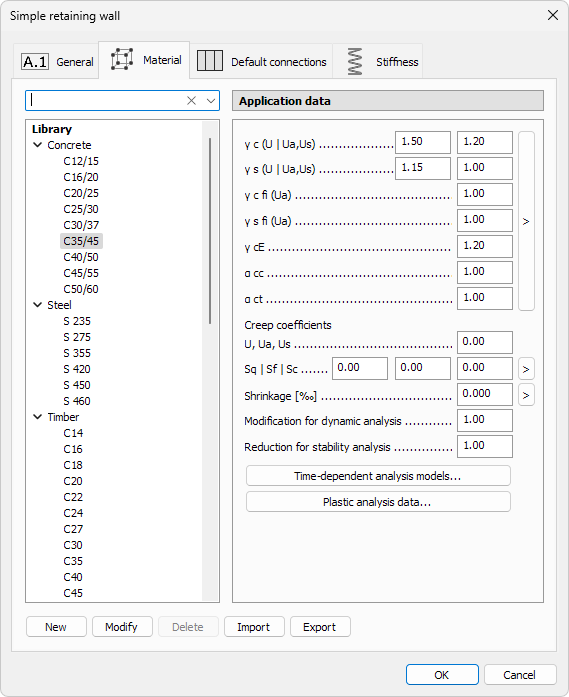
The dialogue consists of three main areas.
On the left hand side:
- Find – search materials by typing the name
- material tree grouped by Concrete, Steel, Timber, General. This shows both materials in library and used materials in project
On the right-hand side:
- analytical factors for the selected material. Every material group has different settings and factors (read below in more detail)
Below the material library are the library manipulation buttons:
- New – add a new material to the currently selected material type (concrete, steel, timber or general). Opens the material specific dialogue with material properties. The new material takes by default the same values as the selected material has when the button was pressed (read below in more detail)
- Modify – modifies the currently selected material properties. Opens the same dialogue as the New button. Can be used for user-created materials. When used on built-in materials, shows the values in read-only format only
- Delete – remove the highlighted entry from the library. You cannot delete the built-in materials
- Import – load a saved .fdlmat (material-library) file. Entries with matching names will be ignored, keeping the local material definitions
- Export – write the entire library (or the selected material group) to an external .fdlmat file for backup or sharing
Material specific analytical factors
Some factors and settings may not be available for all structural elements.
Concrete
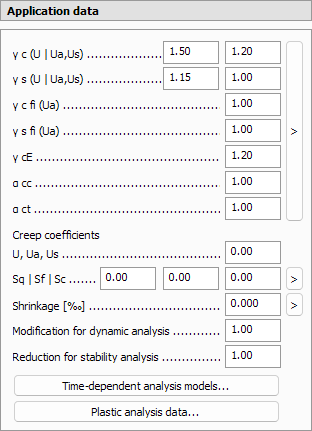
Safety factors
The default values for safety factors are taken from the selected EuroCode national annex.
-
γ c (U | Ua, Us) – partial factor for concrete in regular ultimate limit state and in accidental/seismic state analyses (stated in [G1]EN 1992-1-1 as γc)
-
γ s (U | Ua, Us) – partial factor for reinforcement in regular ultimate limit state and in accidental/seismic state analyses (stated in [G1]EN 1992-1-1 as γs)
-
γ c fi (Ua) – concrete factor for fire design (stated in [G1]EN 1992-1-1 as γc,fi)
-
γ s fi (Ua) – reinforcing steel factor for fire design (stated in [G1]EN 1992-1-1 as γs,fi)
-
γ cE – factor applied to the concrete modulus of elasticity (stated in [G1]EN 1992-1-1 as γcE)
-
α cc – concrete compressive-strength factor (stated in [G1]EN 1992-1-1 as αcc)
-
α ct – concrete tensile-strength factor (stated in [G1]EN 1992-1-1 as αct)
-
> – arrow button next to the safety factors opens a new dialogue window for automatically filling some of the safety factors based on relevant Eurocode chapters

- checkbox for Reduction based on quality control and reduced deviation according to [G1]EN 1992-1-1 A.2.1
- checkbox for Reduction based on using reduced or measured geometrical data in design according to [G1]EN 1992-1-1 A.2.2
- checkbox for Variation of the concrete strength is less than 10% according to [G1]EN 1992-1-1 A.2.1 and A.2.2
- checkbox for Reduction based on assesment of concrete strength in finished structure according to [G1]EN 1992-1-1 A.2.3
Time-dependent coefficients
-
U, Ua, Us – one creep coefficient value for all ultimate limit state combinations
-
Sq | Sf | Sc – different creep coefficient values for corresponding serviceability limit state
-
> – arrow button next to the creep coefficients opens a new dialogue window for automatically calculating the coefficient based on relevant Eurocode annex

-
Shrinkage – uniform shrinkage strain
-
> – arrow button next to the shrinkage strain opens a new dialogue window for automatically calculating the strain based on relevant Eurocode annex

Global modifiers
- Modification for dynamic analysis – factor used in modal calculations
- Reduction for stability analysis – factor used in buckling checks
Additional dialogues
- Time-dependent analysis models… – detailed creep, shrinkage and elasticity settings (read below in more detail)
- Plastic analysis data… – plastic strain-limit inputs (read below in more detail)
Steel

Safety factors
- γ M0 (U | Ua, Us) – partial factor for steel in regular ultimate limit sate and in accidental/seismic state analyses
- γ M1 (U | Ua, Us) – partial factor factor for stability checks in regular ultimate limit sate and in accidental/seismic state analyses
- γ Mfi (Ua) – partial factor factor for fire design
- γ M2 (U | Ua, Us) – bolt shear / slip factor (EN 1993-1-8) in regular ultimate limit sate and in accidental/seismic state analyses
- γ M5 (U | Ua, Us) – factor for pre-tensioned bolts (EN 1993-1-8) in regular ultimate limit sate and in accidental/seismic state analyses
Additional dialogues
- Time-dependent analysis models… – detailed creep settings (read below in more detail)
- Plastic analysis data… – plastic strain-limit inputs (read below in more detail)
Timber

Safety factors
- γ M (U | Ua, Us) – partial factor for timber in regular ultimate limit sate and in accidental/seismic state
- γ Mfi (Ua) – partial factor for fire design
Additional strength parameters
- System strength factor – factor for system effects specified in EN 1995
- k cr (EC5-1-1: 6.1.7) – creep-crack factor from Eurocode 5
- Service class – drop-down list (class 1, class 2 or class 3) corresponding to moisture and temperature conditions
Time-dependent coefficients
- k def (U, Ua, Us) – deformation factor for ultimate combinations
- k def (Sq) – deformation factor for quasi-permanent SLS combination
- k def (Sf) – deformation factor for frequent SLS combination
- k def (Sc) – deformation factor for characteristic SLS combination
Additional dialogues
- Time-dependent analysis models… – detailed creep settings (read below in more detail)
General
General material does not have any additional settings.
Time-dependent analysis models
Some material types (concrete, steel, timber) provide an extra Time-dependent analysis models… button that opens a dialogue with three tabs: Creep, Shrinkage and Elasticity.
Depending on the material, reduced layouts may hide one or more tabs.
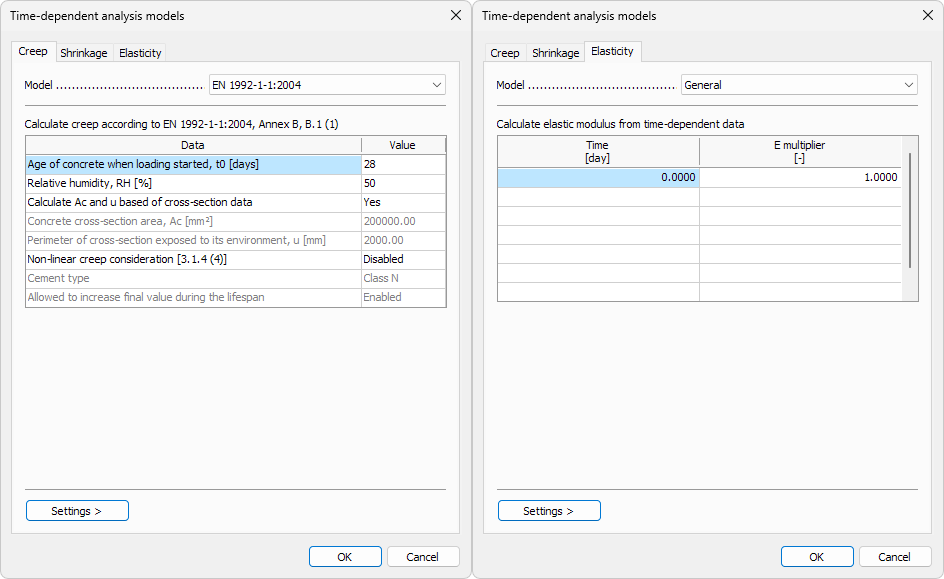
Creep tab
- Model – drop-down list
- Not applied
- EN 1992-1-1 : 2004
- Creep compliance by Data set
- Creep compliance by Prony
Shrinkage tab
- Model – drop-down list
- Not applied
- EN 1992-1-1 : 2004
- General
Elasticity tab
- Model – drop-down list
- Not applied
- EN 1992-1-1 : 2004
- General
Utility menu
- Settings > – only if any option other than Not applied is chosen on a tab, opens the utility menu for saving and loading the settings (read below in more detail)
Plastic analysis data
The Plastic analysis data… button (available for concrete and steel materials) opens a dialogue where you choose which in-elastic phenomena are considered during non-linear calculations and assign numeric limits for each.
Some rows appear only for specific material-element combinations.
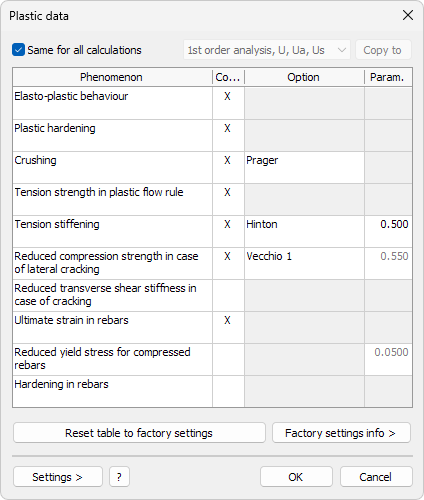
Calculations
- Same for all calculations – when ticked, the same plastic settings apply to every analysis
- Calculation type – drop-down list enabled when the box is unticked
- Copy to – copies the current settings to one or more calculation types
Phenomena table
| Phenomenon | Option | Material |
|---|---|---|
| Elasto-plastic behaviour | - | Concrete, Steel |
| Plastic hardening | - | Concrete |
| Crushing | Crisfield / Cervera / Hinton / Prager | Concrete |
| Tension strength in plastic flow rule | - | Concrete |
| Tension stiffening | Hinton / Vecchio / Linear / Cervera | Concrete |
| Reduced compression strength in case of lateral cracking | Vecchio 1 / Vecchio 2 / Cervera / Model code 2010 / EN 1992-1-1:2023 | Concrete |
| Reduced transverse shear stiffness in case of cracking | - | Concrete |
| Ultimate strain in rebars | - | Concrete |
| Reduced yield stress for compressed rebars | - | Concrete |
| Hardening in rebars | - | Concrete |
| Elasto-plastic strain limit in tension / compression | - | Steel |
| Transverse shear in flow rule | Parabolic / Constant | Steel |
- Consider – tick to activate the phenomenon for the current material
- Option – drop-down list appears only when multiple models exist
- Parameter – numeric limit or reduction factor
Check the Elasto-plastic behaviour to enable the other phenomenon option.
Hover over any of the Phenomenon names in FEM-Design to see a description or explanation for it.
Factory settings
- Reset table to factory settings – restores all rows to the original values shipped with FEM-Design
- Factory settings info > – opens an online help page that explains each phenomenon in detail
Utility buttons
- Settings > – opens the utility menu for saving and loading the settings (read below in more detail)
- ? – opens context-sensitive online help about plastic model for the currently selected structural element
Settings menu
When you click on the Settings button, a new menu opens.

- Save – store the current parameter set with a custom name
- Load – apply a previously saved set
- Save as default – make the current parameters the default for new models
- Load default – restore the dialogue to your saved default values
New material
When you press New or Modify from the library manipulation buttons opens a new dialogue for material properties. Dialogue depends on the selected material type.
Concrete
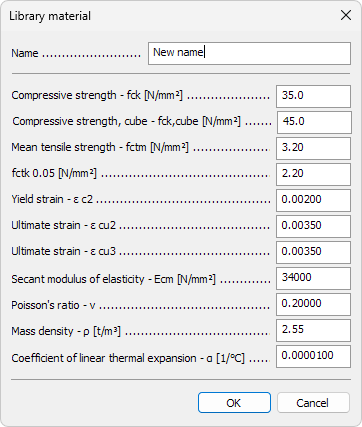
- Name – text field used in schedules, lists and tooltips
- Compressive strength - fck – characteristic cylinder strength
- Compressive strength, cube - fck,cube – characteristic cube strength
- Mean tensile strength - fctm – average axial tensile strength
- fctk0.05 – 5 % fractile tensile strength
- Yield strain - ε – strain at fctm
- Ultimate strain - ε cu2 – strain limit for serviceability calculations
- Ultimate strain - ε cu3 – strain limit for ultimate calculations
- Secant modulus of elasticity - Ecm – elastic modulus at 28 days
- Poisson’s ratio - ν – lateral-to-axial strain ratio
- Mass density - ρ – self-weight
- Coefficient of linear thermal expansion - α – thermal expansion per temperature degree
Steel
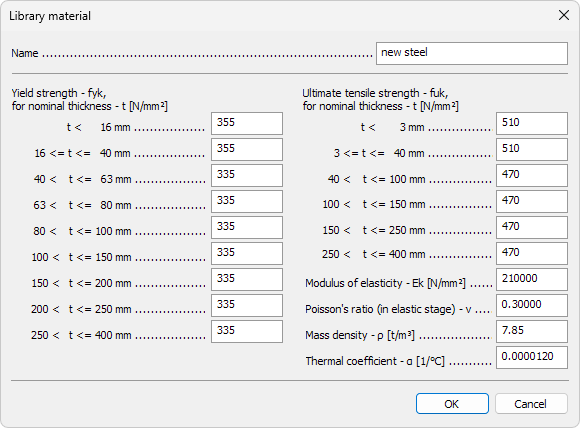
- Name – text field used in schedules, lists and tooltips
Yield strength - fyk
On the left you can enter characteristic yield strength for the relevant nominal thickness ranges.
Ultimate tensile strength - fuk
On the right you can enter characteristic ultimate tensile strength for some thickness ranges.
Additional properties
- Modulus of elasticity - Ek – Young’s modulus
- Poisson’s ratio - ν – lateral-to-axial strain ratio (elastic stage)
- Mass density - ρ – self-weight
- Coefficient of linear thermal expansion - α – thermal expansion per degree of temperature change
Timber
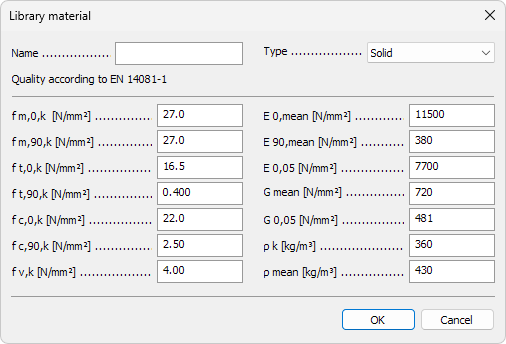
- Name – text field used in schedules, lists and tooltips
- Type – drop-down list to select the product category
- Solid
- Glued laminated
- LVL
- Kerto
Strength properties
- f m,0,k – bending strength parallel to grain
- f m,90,k – bending strength perpendicular to grain
- f t,0,k – tensile strength parallel to grain
- f t,90,k – tensile strength perpendicular to grain
- f c,0,k – compressive strength parallel to grain
- f c,90,k – compressive strength perpendicular to grain
- f v,k – shear strength
Stiffness & density
- E 0,mean – mean modulus of elasticity parallel to grain
- E 90,mean – mean modulus of elasticity perpendicular to grain
- E 0,05 – 5 % fractile modulus of elasticity parallel to grain
- G mean – mean shear modulus
- G 0,05 – 5 % fractile shear modulus
- ρ k – characteristic density
- ρ mean – mean density
General

- Name – text field used in schedules, lists and tooltips
- Mass density - ρ – self-weight (kg / m³)
- Modulus of elasticity - E – Young’s modulus (MPa)
- Poisson’s ratio - ν – lateral-to-axial strain ratio
- Coefficient of linear thermal expansion - α – thermal expansion per degree of temperature change