Foundation General
The General tab appears in every foundation-type tool and sets up the soil interaction and insulation properties that apply to the element. Following tools use this dialogue:
- Isolated foundation
- Wall foundation
- Foundation slab
When you open the General tab of a foundation’s Default settings, the following dialogue window appears.
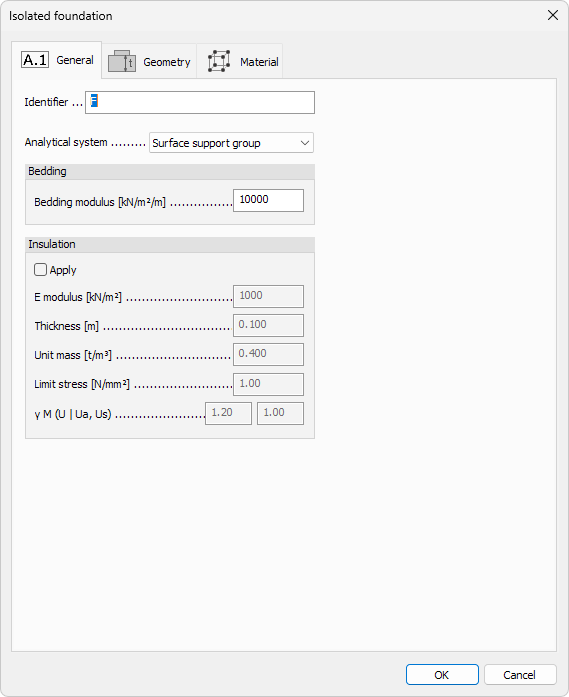
Identifier
- Identifier – label shown in schedules, lists, and tooltips for the foundation element
Analytical system
-
Analytical system – drop-down list that defines how the soil support is modelled
- Surface support group
- Point support group
- Line support group
-
Remove soil above slab (basement) – checkbox available only for Foundation slab.
When selected, the program ignores soil weight above the slab during analysis.
Bedding modulus
Numeric fields for spring stiffness between the foundation and soil:
- Vertical – compression stiffness in global Z (all foundation types)
- x′ modulus – horizontal stiffness along local x′ (Foundation slab only)
- y′ modulus – horizontal stiffness along local y′ (Foundation slab only)
Isolated and wall foundations use a single Vertical spring.
Foundation slabs add x′ and y′ springs to model in-plane resistance.
Insulation
Enable and define insulating layers between the foundation and the soil.
- Apply – master checkbox to activate insulation parameters
- E modulus – elastic modulus of the insulation material
- Thickness – layer thickness
- Unit mass – mass density used in dynamic calculations
- Limit stress – allowable stress of the insulation layer
- γ M – partial safety factor