Deviation
Use the Deviation tool to calculate deviation load according to [G1]EN 1993-1-1:2005 5.3.2 (3-7).

When you select the Deviation tool, a new dialogue window opens.
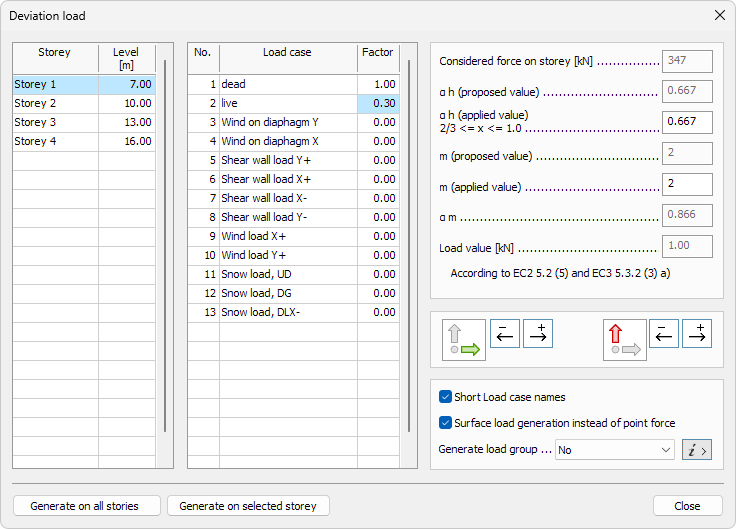
On the left hand side, you can see a list with all the Storeys in the model. You can select a Storey from the list and generate load on that Storey.
- Storey – name of the Storey
- Level – height of the level
In the middle, you can see a list with all the load cases in the model. You can set a factor for each load case.
- Load case – name of the load case
- Factor – percentage of the load to be considered in the deviation load calculation
In the top of the right hand side, you can see a list with all the parameters you can set for the load generation for each Storey.
- Considered force on storey – see the total load that is considered for the current Storey
- a h (proposed value) – reduction factor for height h applicable to columns
- a h (applied value) – user-defined value that will override the proposed value for the reduction factor for height h applicable to columns
- m (proposed value) – estimated number of supporting structures for the storey
- m (applied value) – user-defined value that will override the proposed value of supporting structures for the storey
- α m – reduction factor for the number of columns
- Load value – value of the total deviation load that will be applied on the storey
In the middle of the right hand side, you can select which load directions you would like for the deviation load to generate.
| Description | |
|---|---|
 | Use the X- and X+ buttons to toggle which X direction load you want to generate. You can select one, both or none. |
 | Use the Y- and Y+ buttons to toggle which Y direction load you want to generate. You can select one, both or none. |
In the bottom of the right hand side, you can select additional settings for load case and groups generation.
- Short load case names – select to shorten load combination names. Short name includes only the deviation load designator and direction (for example "Deviation Y-"). Long names include all the load cases' position numbers and their factors (for example, "Deviation Y- (Generated by 1.00xLC1+0.3xLC2)").
- Surface load generation instead of point force – select to generate deviation load as surface load on the plates instead of point loads.
- Generate load group – select from the drop down list which type of load groups you want to generate from the deviation load:
- No – select if you don't want to generate load groups
- Yes, alternative – select to generate deviation load group which contains custom relationships with one load case per one direction
- Yes, multi-relational – select to generate deviation load group which contains multi-relational custom relationships with multiple suitable load cases per one direction
- i > – press the info button next to the drop down list to see the different between load group relationships options. This opens a new dialogue window (read below in more detail)
In the bottom of dialogue window, you can select one of two buttons to generate loads.
- Generate on all stories – use this button to generate deviation load on all the Storeys in the list above
- Generate on selected storey – use this button to generate deviation load only on the Storeys that is currently selected in the list above
Info button for load groups
When you press the info button i > next to the Generate load group drop down list, a new dialogue window opens. In this dialogue you can see with examples of how the load group would be generated.
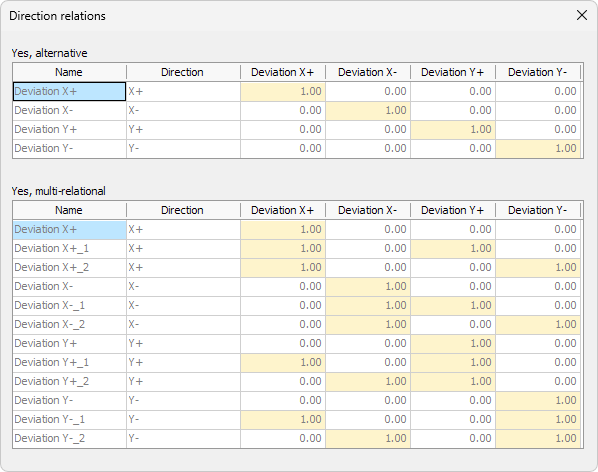
To read about directional relationship in load groups see the topic
User interface ➔ Tab menus ➔ Loads ➔ Panel Load case, combination, group and construction stage ➔ Load groups