Export reactions as loads
The Export reactions as loads tool is used to convert calculated support reactions into loads that can be applied back to the model or into another model.

When you activate this tool, you must first select one or more support elements in the model.
After the selection is made, a dialogue window opens.
The dialogue contains two tabs: General and Options.
General

The General tab controls where and how the generated loads are created.
Path of the exported model
Define the file path where the exported model with generated loads will be saved.
Extend generated load case names with
- Prefix – text added before the generated load case names
- Postfix – text added after the generated load case names
These fields are optional and are typically used to clearly identify generated load cases.
Results to generate loads from
Select which analysis results are used as the basis for load generation:
- Load cases – generate loads from individual load cases
- Load combinations – generate loads from load combinations
When Load cases is selected:
- Add load combinations to the model – include load combinations in the exported model
When Load combinations is selected, the available combination types can be chosen (for example U, Ua, Us, Sq, Sf, Sc).
Options
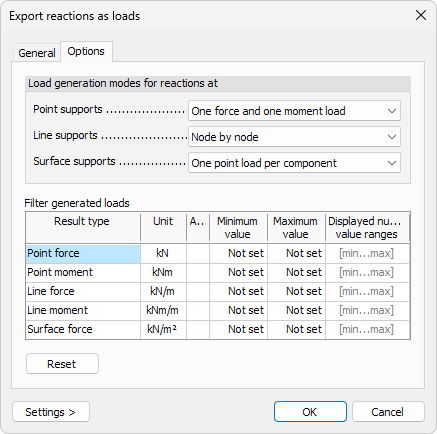
The Options tab controls how reactions are converted into loads and allows filtering of generated loads.
Load generation modes for reactions at
Define how reactions are converted to loads depending on support type:
- Point supports – select how forces and moments are generated at point supports. There are two options:
- One load per component– generate a separate load for each reaction component (forces and moments are created as individual loads)
- One force and one moment load – generate one combined force load and one combined moment load per support
- Line supports – select how reactions are converted along line supports. There are four options:
- Node by node – generate loads at each node along the line support based on the local reaction values
- Constant by element – generate constant loads per finite element along the line support
- Linear – generate loads with linear distribution along the line support based on reaction values
- Constant – generate one constant load applied along the entire line support
- Surface supports – select how reactions are converted over surface supports. There are four options:
- One point load per component – generate separate point loads for each reaction component
- One point load – generate one combined point load representing the resultant reaction
- One surface load per component – generate separate surface loads for each reaction component
- One surface load – generate one combined surface load representing the resultant reaction
Filter generated loads
Use the table to limit which generated loads are created based on value range.
For each result type, you can define:
- Abs. – select if you want the value range to represent absolute values
- Minimum value – minimum value required for a load to be generated
- Maximum value – maximum value allowed for a load to be generated
- Displayed numeric value ranges – define whether loads are generated inside or outside the defined value range. There are two options:
- [min…max] – use only numeric values that fall between the defined minimum and maximum values
- …]min max[… – use all numeric values except those that fall between the defined minimum and maximum values
Controls
At the bottom of the dialogue, you can use:
-
Reset – clear all filtering values in the table
-
Settings > – opens a small menu for managing display settings:
- Save – save the current settings
- Load – load previously saved settings
- Save as default – store the current settings as default for future
- Load default – restore the program’s default settings