Connection forces
The Connection forces analysis result shows forces and moments in connection elements under the current loading or analysis conditions. It represents how loads are transferred from one structural element into another via the connecting element. The connecting elements are both the edge connections of the shells and the connection elements in the Modelling tools panel in Structure tab (Point connection, Line connection, Surface connection).
Connection forces are very similar to the Reactions. While Connection forces are shown for connection elements, the Reactions are shown for support elements.
Connection forces are available for several static and dynamic analysis contexts.
- Load cases – connection forces from individual load cases
- Moving load maximum – envelope of maximum connection forces due to moving loads
- Moving load influence line / surface – influence results for connection forces
- Construction stages – connection forces during staged construction
- Load combinations – connection forces from defined load combinations
- Maximum of load combinations – envelope of connection forces from multiple combinations
- Maximum of load groups – envelope of connection forces grouped by load groups
- Seismic analysis – connection force response from seismic loading
- Time history – ground acceleration – time-dependent connection forces from ground motion
- Time history – excitation force – time-dependent connection forces from applied forces
- Periodic excitation – steady-state dynamic connection forces response
Result selection
Depending on the selected analysis context, additional selections are required to display Connection forces. One or more of the following parameters may need to be selected from the result lists:
- load case type, such as ultimate or quasi-permanent
- load case or load combination
- connection force component, for example force or moment direction, for envelope-type results
- construction stage
Only the selections relevant to the active analysis type are shown.
Result display
connection forces use a specialised result display that is fixed for this result type. The forces are visualised using different graphical representations depending on the connection type and component:
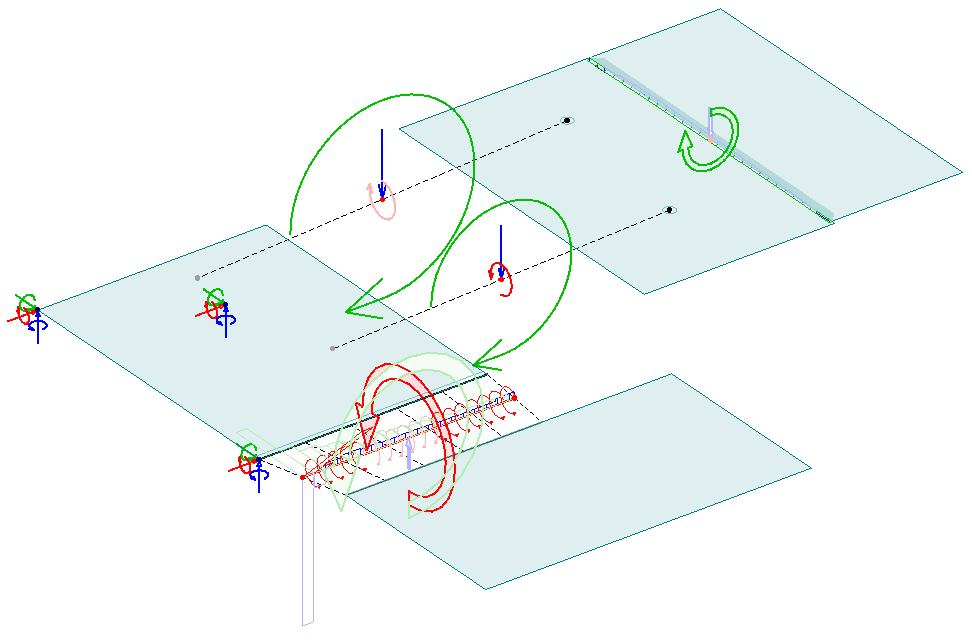
These visualisations allow you to clearly interpret the magnitude, direction and distribution of connection forces and moments in the connection elements system.
Key characteristics of the display:
- straight thin arrows – connection forces
- curved thin arrows – connection moments
- straight double lined arrows - resultant forces
- curved double lined arrows - resultant moments
- 2D graphs – distributed connection forces on line connections and edge connections
- vivid colours – results on the positive direction of the axis (values are positive)
- muted colours – results on the negative direction of the axis (values are negative)