Equilibrium
The Equilibrium tool is used to check the equilibrium between applied loads and their corresponding reactions.

When you activate this tool, a dialogue window opens.
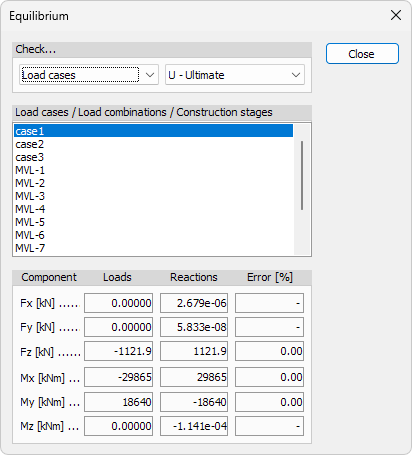
The dialogue allows you to evaluate whether the applied loads are balanced by the calculated reactions for a selected calculation case.
Check...
At the top of the dialogue, you can define which results are checked:
- drop-down menu on the left – select whether the equilibrium check is performed for Load cases, Load combinations, or Construction stages
- drop-down menu on the right – select the calculation type (for example U – Ultimate) where applicable
Load cases / Load combinations / Construction stages
The list shows all available load cases, load combinations or construction stages, depending on the selected Check... option.
Select one item from the list to evaluate its equilibrium.
Equilibrium results
The lower part of the dialogue shows the comparison between loads and reactions for each component:
- Component – force and moment components (Fx, Fy, Fz, Mx, My, Mz)
- Loads – summed applied loads for the selected case
- Reactions – summed reaction forces or moments
- Error [%] – relative difference between loads and reactions
Moment reactions are calculated around the global origin.
For a model in equilibrium, the values in Loads and Reactions should be equal, resulting in zero or near-zero error. Small numerical deviations may occur due to rounding or numerical precision.