Moving load dynamic
Use Moving load dynamic to calculate the dynamic response of the structure under moving loads.
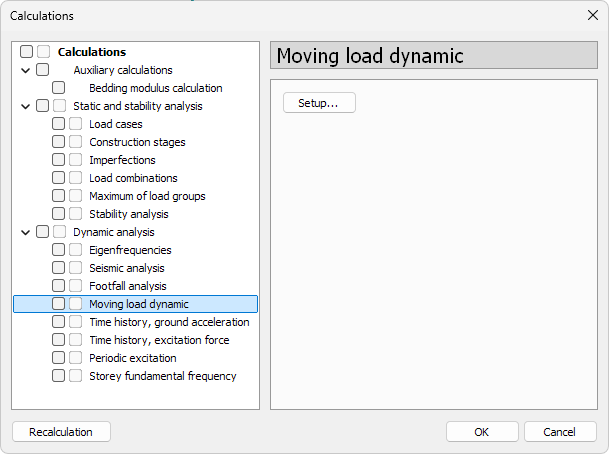
- Setup… – opens the Moving load dynamic effect calculation setup dialogue
Moving load dynamic effect calculation setup
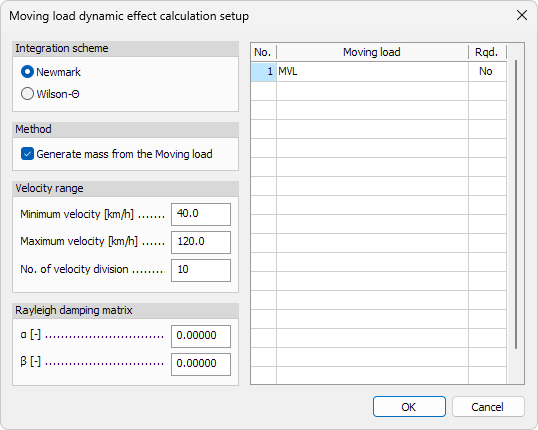
The setup contains the following sections:
Integration scheme
Choose the numerical integration method used for the time-domain solution:
- Newmark – default integration scheme
- Wilson-Θ – alternative integration method with additional numerical damping
Method
- Generate mass from the Moving load – when enabled, the program automatically generates the mass matrix contribution from the selected moving load
Velocity range
- Minimum velocity – lowest velocity of the moving load
- Maximum velocity – highest velocity of the moving load
- No. of velocity division – number of velocity steps between the minimum and maximum values
Rayleigh damping matrix
Define Rayleigh damping coefficients:
- α – mass-proportional damping coefficient
- β – stiffness-proportional damping coefficient
Moving load list
The table lists all available moving loads in the project.
- Rqd. – mark the moving loads that should be included in the moving load dynamic calculation