Footfall analysis
Use Footfall analysis to evaluate vibration response of structures subjected to walking-induced dynamic loading.
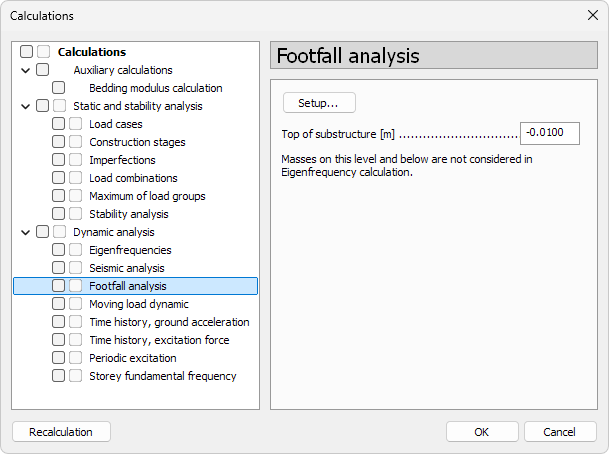
- Top of substructure – elevation below which masses are ignored in the eigenfrequency calculation used by footfall analysis
- Setup… – opens the Footfall analysis options dialogue
Footfall analysis options
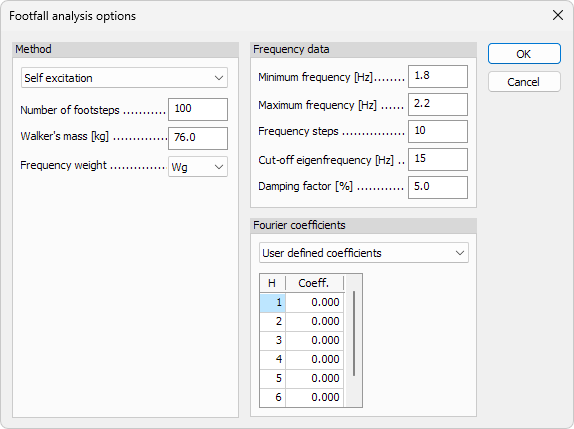
The options are arranged into three sections: Method, Frequency data, and Fourier coefficients.
Method
-
Method – drop-down menu with three choices. The layout of the dialogue changes depending on the selected option:
- Self excitation – uses individual walker parameters
- Full excitation – uses the same input fields as Self excitation
- Rhythmic crowd load – replaces the input fields with a load case table
When Self excitation or Full excitation method is selected, these options become available:
- Number of footsteps – number of steps considered in the excitation
- Walker’s mass – mass of the person causing the vibration
- Frequency weight – weighting function used in comfort evaluation (for example Wg)
When Rhythmic crowd load method is selected, these options are replaced with a table.
- Load cases table – lists all load cases in the model
- Sel – select which load cases participate in the rhythmic crowd excitation
Frequency data
- Minimum frequency – start of the frequency range
- Maximum frequency – end of the frequency range
- Frequency steps – number of steps between minimum and maximum frequency
- Cut-off eigenfrequency – limit above which eigenmodes are ignored
- Damping factor – structural damping expressed as a percentage
Fourier coefficients
- Fourier coefficients – drop-down menu selecting the source of harmonic coefficients. The available options are:
- User defined coefficients – enables a table where harmonic values can be entered manually
- SCI P354 table 3.1 – uses predefined coefficients
- SCI P354 formula 20 – uses formula-based coefficients
- The Concrete Centre table 4.3 – uses predefined coefficients
- According to Danish Annex – shows additional parameters for the Danish national annex ([G1]DS/EN 1990 DK NA:2024)
When User defined coefficients is selected:
- H / Coeff. table – manually enter harmonic numbers and their corresponding coefficients
When SCI P354 formula 20 is selected:
- Number of walkers – numeric field defining the number of walkers used in the formula
When According to Danish Annex is selected:
- Effective number of people – numeric field defining the number of people generating the excitation
- Activity – choose the type of activity for the excitation
- Possibility to move about freely
- Reduced possibility to move about
- Walking