Calculate
Calculate panel
The Calculate panel contains a single tool — Calculate.

Calculate panel also has the interactive clickable panel name that will take you to the relevant settings in the Settings menu.
Calculate tool
Use Calculate tool to select and run any type of analysis in FEM-Design and change the analysis settings.

When you select the Calculate tool a new dialogue window opens.
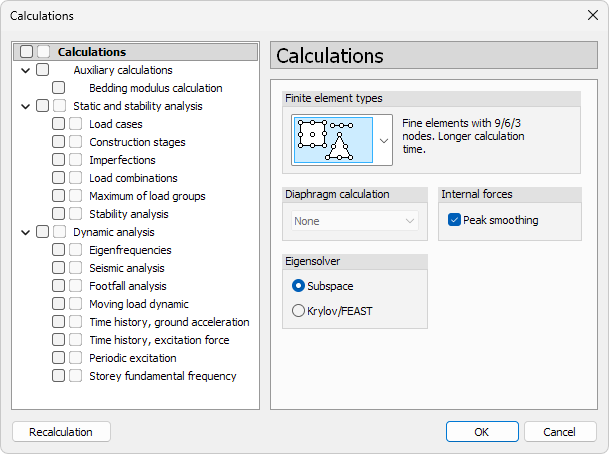
On the left side you can choose which calculations to run. On the right side, you can set the options for the selected calculation type.
When you select one of the main groups, all the sub-groups or analysis types under that group will be selected.
Calculations
- ↘ Calculations – change some overall settings for all the analysis
Auxiliary calculations
- ↘ Bedding modulus calculation – run analysis to estimate bedding modulus for foundation slabs
Static and stability analysis
- ↘ Load cases – run analysis for individual load cases
- ↘ Construction stages – analysis using staged construction
- ↘ Imperfections – apply geometrical imperfections
- ↘ Load combinations – analyse defined load combinations
- ↘ Maximum of load groups – evaluate envelope maxima
- ↘ Stability analysis – determine global buckling modes
Dynamic analysis
- ↘ Eigenfrequencies – calculate natural frequencies and mode shapes
- ↘ Seismic analysis – response spectrum analysis
- ↘ Footfall analysis – human-induced vibration check
- ↘ Moving load dynamic – time-dependent response under moving loads
- ↘ Time history, ground acceleration – earthquake acceleration input
- ↘ Time history, excitation force – general force-based excitation
- ↘ Periodic excitation – harmonic loading
- ↘ Storey fundamental frequency – modal check for storey levels